
Is Webflow Good for SEO? Pros, Cons & Features (2026)



I've worked on over 100 Webflow sites for clients ranging from early-stage SaaS companies to established e-commerce brands. The question I hear most often during platform discussions: "Is Webflow actually good for SEO, or am I trading design flexibility for organic growth?"
From what I've observed, Webflow delivers strong SEO results when you know what you're doing, but it's not a magic fix. I'll walk you through the capabilities and the honest limitations I've encountered so you can decide if it fits your situation.
Is Webflow Good for SEO?
Yes, Webflow is good for SEO. It offers built-in features such as customizable title tags and meta descriptions, automatic XML sitemaps, clean semantic code, SSL, redirects, schema support, and fast hosting through a global CDN.
While these features provide a strong foundation, achieving high rankings still depends on properly configuring your SEO settings, creating high-quality content, and maintaining a well-structured website.
What Webflow Does Well for SEO
Webflow handles a lot of SEO work natively. Understanding these built-in capabilities helps you make the most of what Webflow offers without relying on third-party solutions.
Direct On-Page SEO Controls Without Plugins
On-page elements are what Google reads to understand a page and what users see in the results before they click. Your meta title and description are the headline and preview text in search, so they drive whether someone clicks at all. Your H1-H6 tags tell Google how the content is structured, and your slug and alt text feed it more context.
In webflow, you can edit everything natively: meta titles and meta descriptions, H1-H6 heading tags, URL slugs for every page, image alt text, and Open Graph tags for social sharing.
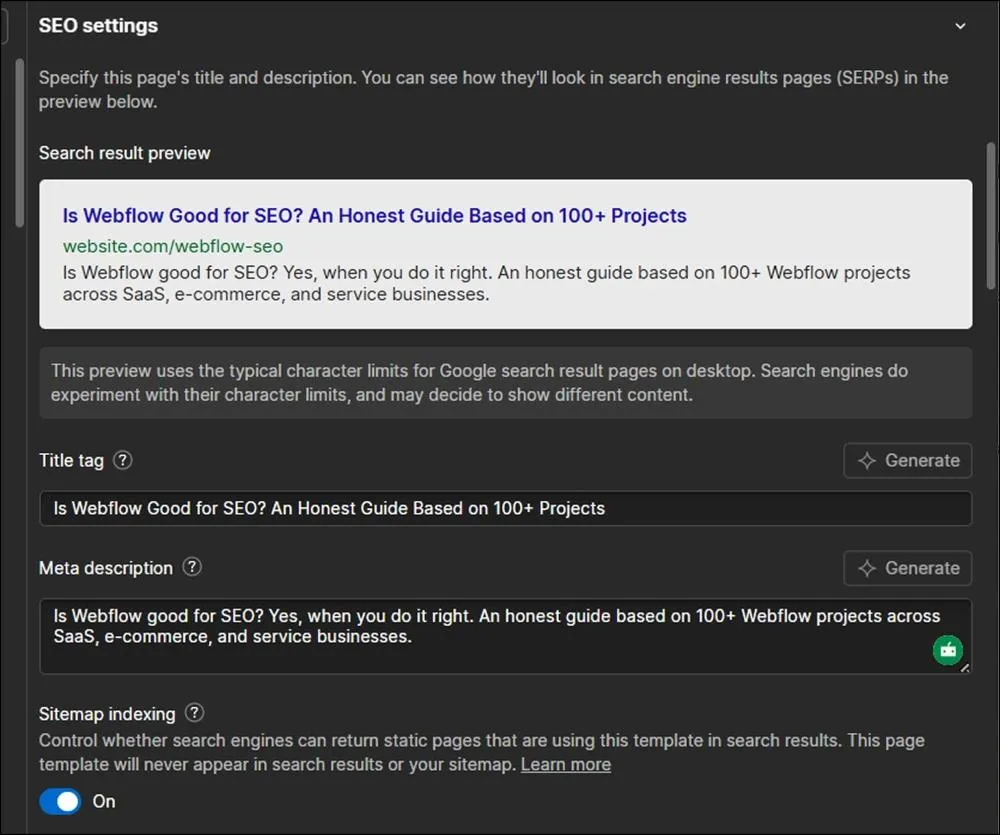
Every page lets you set its own canonical URL. This helps you handle duplicate content, filtered pages, and articles you republish on other sites. Most no-code builders hide this setting or make you find a workaround.
You can set a unique Open Graph image and description on every page, and pull them dynamically from CMS templates. Better social click-through brings more traffic, which feeds back into your SEO.
For CMS-driven sites, Webflow's page-level SEO controls let you create template-level settings that auto-populate for blog posts and collection pages. You can build hundreds or thousands of pages from one template. Location pages, product pages, comparison pages, integration pages. All of these pull straight from CMS fields:
- Meta titles
- Descriptions
- H1s
- Schema
- Open Graph tags
On WordPress, you usually need a custom theme or a tool like WP All Import. In Webflow, it works out of the box.
Editor Access Without Designer Risk
SEO is never a one-time task. Titles, descriptions, slugs, and images need regular updates as rankings and click-through rates change. The easier those edits are to make, the more likely they actually happen.
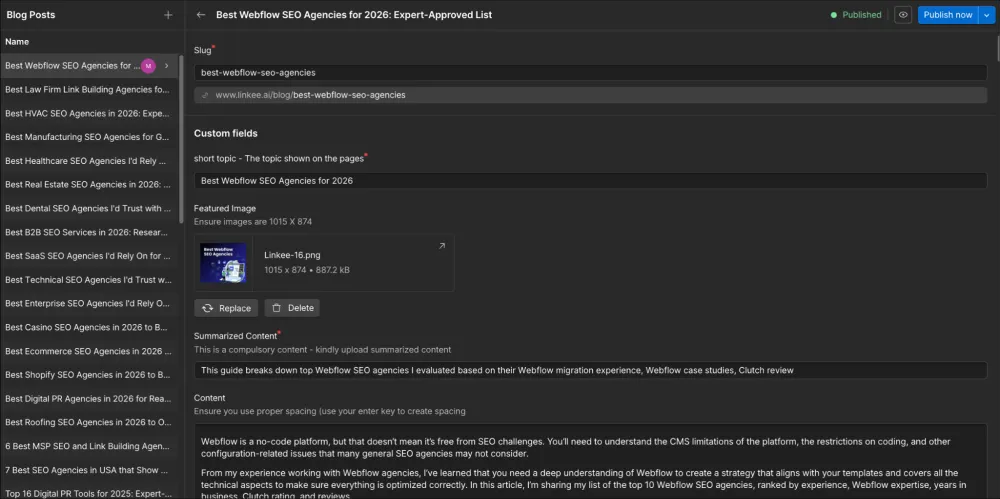
Your writers can update meta titles, descriptions, slugs, alt text, and Open Graph data in the Webflow Editor without opening the Designer. The layout stays safe.
This matters when SEO and design sit on different teams. Your content team ships SEO updates every day without waiting on a designer or developer, and the structure of the site stays protected.
This matters for SEO because on-page work is never finished. You're constantly refining titles and descriptions as you see what ranks and what gets clicks, and when those edits are quick and safe to make, they actually get made instead of sitting in a backlog.
Mobile-First Indexing and Responsive Design
Google primarily uses the mobile version of your site for ranking and indexing, the desktop version is secondary. Google completed its transition to mobile-first indexing, and mobile devices account for the majority of global web traffic.
Webflow is built around responsive breakpoints: desktop, tablet, mobile landscape, and mobile portrait. Every element adapts across screen sizes. Why responsive design matters: you can't bolt on mobile optimization later. Webflow forces mobile-first thinking from the design stage.
Webflow Generates Clean Code
Clean code helps search engines crawl, understand, and index your pages more efficiently. It also contributes to faster loading times and better accessibility.
Webflow generates standards-compliant HTML5 with proper semantic tags like <header>, <nav>, <article>, and <section>.
Why does clean code matter? Semantic HTML enables Google to rapidly index your content and process the different elements of your pages appropriately. Proper heading hierarchy signals content structure to Google's algorithms.
Unlike WordPress page builders that nest 8 divs deep, Webflow outputs lean markup that loads in milliseconds. I've inspected the source code on hundreds of sites, and the difference is immediately visible. The Webflow code quality documentation explains their approach in detail.
Most no-code builders that let you edit visually create messy code in return. Webflow is the exception. Your marketing team can update pages, swap images, and change copy through the Editor, and the HTML stays clean underneath. You get easy editing without paying for it in SEO.
Automatic Technical SEO Features
Technical SEO creates the foundation that allows search engines to crawl, index, and trust your website. Missing SSL certificates, broken redirects, or missing sitemaps can all negatively affect search performance.
What's included automatically without any configuration:
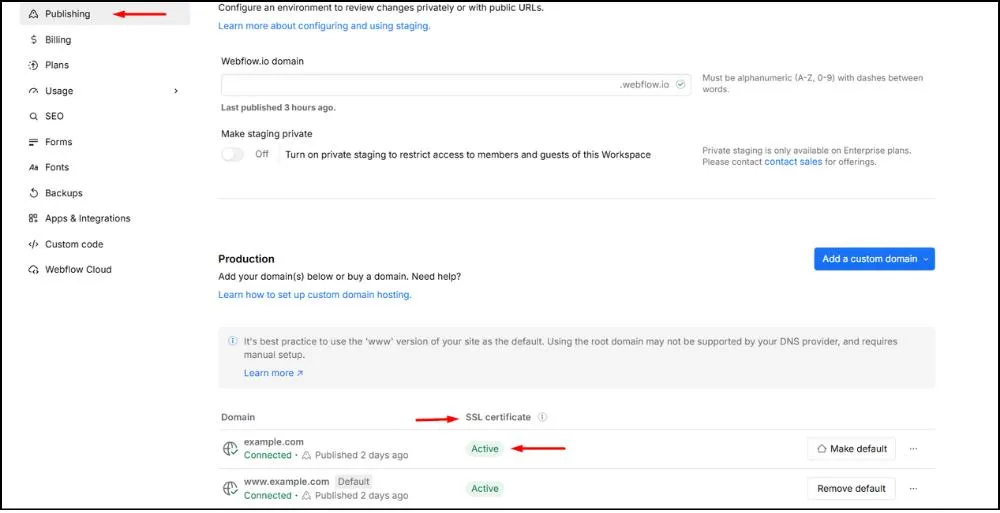
- SSL certificates (HTTPS): A confirmed ranking factor
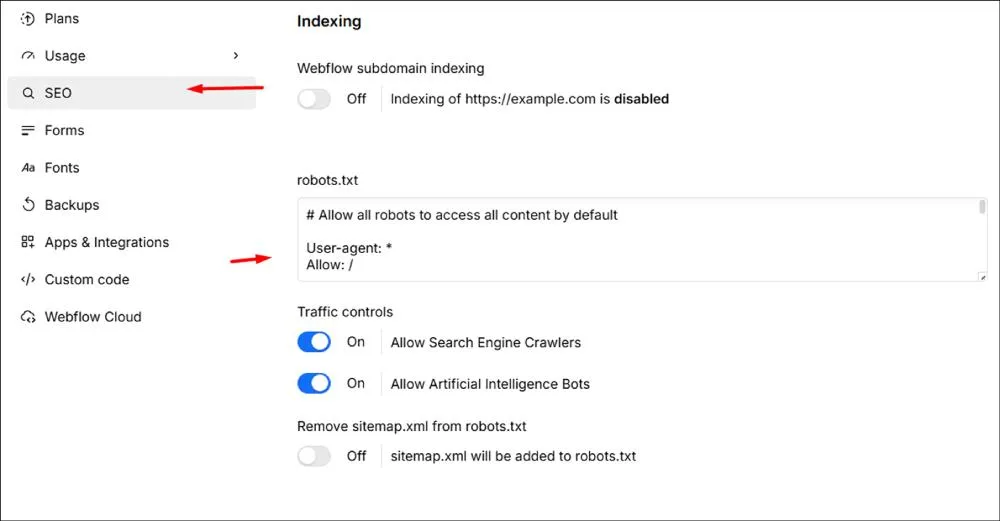
- XML sitemap generation: Updates when you publish
- Robots.txt access: Full control over crawler directives
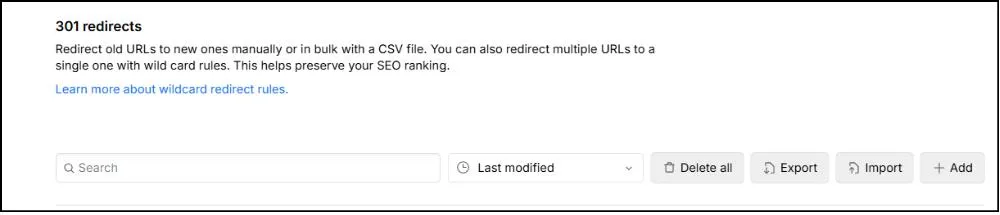
- 301 redirect management: Preserve link equity during URL changes
- CSS and JS minification: Runs automatically when you publish. No build tools or plugins to set up.
- HTTP/2 and HTTP/3 support: Built in by default, which speeds up pages with lots of images or scripts.
- Noindexed staging by default: The webflow.io preview link is set to noindex automatically. Your staging site never competes with your live site in Google.
- Custom 404 pages: Keeps people on your Webflow website when they land on a broken link.
On other platforms, SSL certificates, sitemaps, and redirects require plugins or manual server configuration. In Webflow, they work out of the box. The site-level SEO documentation covers the specifics.
Built-In CDN and Global Performanforce
Page speed is an important ranking factor because both Google and users expect websites to load quickly. One of the biggest contributors to page speed is how quickly your website’s files reach visitors around the world.
This is where a Content Delivery Network (CDN) comes in. Instead of storing your website on a single server in one location, a CDN copies your site’s files across dozens of servers worldwide. When someone visits your website, those files are delivered from the server closest to them rather than one on the other side of the world. The shorter the distance the data has to travel, the faster your pages load.
Webflow includes a global CDN powered by Fastly and AWS CloudFront. Your site loads from servers geographically close to each visitor, delivering DNS responses 19% faster on mobile and 60% faster on desktop compared to origin servers, which translates to faster first-byte times for users worldwide.
The performance impact is measurable. A global CDN reduces Time to First Byte (TTFB) and improves Largest Contentful Paint (LCP), both Core Web Vitals metrics that Google tracks.
Real-world difference: A site loading in 800ms from New York might load in 900ms from Singapore with a CDN. Without one, that same site could take 3+ seconds internationally.
Here's what the CDN gives you:
- DNS responses 19% faster on mobile and 60% faster on desktop compared to origin servers
- Lower Time to First Byte (TTFB) and improved Largest Contentful Paint (LCP), both Core Web Vitals metrics Google tracks
- Faster international load times. A site that loads in 800ms from New York might load in 900ms from Singapore with a CDN. Without one, the same site could take 3+ seconds
- Edge caching with fast global updates. When you hit publish, Fastly spreads your changes across the network in seconds, so Google sees them right away
- Automatic CSS and JS minification on publish
- Responsive image serving and lazy loading on inline images
- Native forms with reCAPTCHA and submission handling built in, so you're not loading Contact Form 7 or Gravity Forms scripts on every page
What you still control: image compression before upload, animation complexity, and third-party script management.
Schema Markup via Custom Code
Schema markup is extra code that tells Google what your content actually is, not just the words on the page. It is what turns a plain search result into a richer one: the star ratings under a product, the FAQ questions that open up below a page, and the breadcrumb path or event details that show before anyone clicks. Those results take up more room and tend to get more clicks than a standard link, so schema is one of the more useful things you can add to a page. On most platforms it is hard to set up.
Webflow lets you add custom code at both the site level and the page level, inside the head and just before the body closes. That opens up a lot of options.
- JSON-LD schema for Article, Product, FAQ, LocalBusiness, BreadcrumbList, HowTo, and Review
- Google Tag Manager and analytics scripts
- Meta tags that Google supports but Webflow doesn't expose in the UI
- Third-party widgets and chat tools
The real power comes from mixing custom code with CMS field embeds. You can output a unique schema for every item in a collection. Every blog post, product, or location page gets its own structured data without any manual work. People often think Webflow can't do this. It can.
Webflow SEO Limitations to Know
Most of these limitations only matter at scale or for specific use cases. Here's what's missing, harder, or different in Webflow, and when those gaps actually affect your SEO.
No Plugin Ecosystem Like WordPress
WordPress users coming to Webflow notice this first: there's no plugin marketplace. Everything works through native features, which means a different workflow rather than a worse one.
- No Yoast, Rank Math, or All in One SEO
- No automated schema generation or content analysis scoring
- No bulk optimization tools
The flip side is what you don't have to deal with: plugin conflicts, security vulnerabilities from third-party code, and performance hits from stacked dependencies.
Webflow Takes Time to Learn
Webflow requires understanding web design concepts like the box model, flexbox, and responsive breakpoints. It's easier than coding from scratch but harder than Wix or Squarespace drag-and-drop.
Poor implementation (broken layouts, slow load times) hurts rankings regardless of how good the underlying platform is. Webflow University offers free training that's worth the time investment before you start a serious project.
Server-Side Access Limitations
You can't set custom response headers, configure server-level redirects, tune advanced caching rules, or modify .htaccess. Concretely: no X-Robots-Tag headers for PDFs, no server-side A/B testing, and no custom cache TTL.
This matters for large-scale programmatic SEO, complex enterprise setups, and sites that need edge-level logic. For typical marketing sites, you'll never notice it's missing.
CMS Limits on Very Large Sites
Webflow's CMS scales well, but very large sites hit structural limits that need planning around.
- 10,000 items per site on most paid plans (higher on Enterprise)
- Managing 50,000+ pages requires splitting content across collections
- Bulk editing is less robust than WordPress
Once you're past that scale, careful indexing strategy and content governance become critical. Check Webflow's pricing page for current thresholds.
The Bottom Line: Is Webflow Worth It?
Yes, when you do it right.
Webflow gives you the basics: clean code, fast hosting, all the on-page settings you need, and a CMS that handles content at scale. You don't need plugins to get a site that search engines can read and rank.
But Webflow can't fix bad habits. If you upload massive images, write thin content, or skip schema markup, your rankings will suffer no matter how good the platform is.
After 100+ projects, my honest take is this: Webflow works really well if you're willing to learn it. It's a strong fit for teams that take SEO seriously and have a content strategy to back it up. It's not the right pick if you want something that handles SEO for you in the background.
The tools are there. What you do with them is what matters, and what most teams need is someone who's already done it professionally. If that's where you are, our Webflow SEO team can help.
References
- https://www.seoforgooglenews.com/p/why-semantic-html-matters-for-seo
- https://developers.webflow.com/code-components/introduction
- https://webflow.com/webflow-way/seo/page-level-seo
- https://webflow.com/webflow-way/seo/site-level-seo
- https://www.fastly.com/
- https://webflow.com/integrations/amazon-cloudfront
- https://developers.google.com/search/docs/appearance/core-web-vitals
- https://developers.google.com/search/blog/2023/10/mobile-first-is-here
- https://webflow.com/integrations/disqus
- https://university.webflow.com/
- https://webflow.com/pricing
- https://pagespeed.web.dev/
- https://support.google.com/webmasters/answer/9205520
- https://ahrefs.com/
- https://www.semrush.com/
- https://www.screamingfrog.co.uk/seo-spider/
Maria Harutyunyan is the Co-founder and Head of SEO at Loopex Digital. She specializes in general SEO and strategy for SaaS, e-commerce, and B2B brands. An expert in on-page (onsite) SEO with more than 10 years in search, she is recognized by the SEO community as one of the top voices in the field. She has been featured in Forbes, quoted as an SEO expert on Shopify, and writes for Convince & Convert, SE Ranking, and Mangools (KWFinder). She is also the founder of Armenia's first SEO Academy, having trained 500+ marketers.
Submit the form - Get Free Proposal
%202.png)
24 hours
Don’t forget to share this post!
Latest Articles





Submit the form - Get Free Proposal
24 hours

