
WordPress vs Webflow for SEO: An Honest Comparison for 2026



I've migrated dozens of sites between WordPress and Webflow, and the "which is better for SEO" debate misses the point entirely. Both platforms can rank well. The real question is which one fits your team's skills, your content volume, and how much technical maintenance you're willing to handle.
After working with 540+ clients on platform decisions, I've watched WordPress sites outrank Webflow competitors and vice versa. I'll break down exactly how each platform handles technical SEO, Core Web Vitals, security, and ongoing costs so you can make the right call for your situation.
Webflow vs WordPress SEO Compared at a Glance
The clearest way to see how these platforms differ is to line them up on the factors that actually affect rankings: technical SEO controls, out-of-the-box performance, and what each platform offers.
Here's what I've seen across hundreds of projects:
| Factor | WordPress | Webflow |
|---|---|---|
| Best for | Content-heavy sites, e-commerce, and custom integrations | Marketing sites, design-focused brands, small teams |
| SEO capabilities | Deep control via plugins like Yoast and Rank Math, with room for advanced use cases | Strong native controls that cover the fundamentals |
| Ease of use | Flexible, but requires technical knowledge or a developer | Lower technical barrier: visual interface, no developer needed |
| Design & UI/UX | Theme-based; 14,000+ themes to start from, customized via page builders | Visual canvas with pixel-level control; build custom designs from scratch |
| Performance consistency | Varies by hosting, theme, and plugins | Predictable baseline thanks to managed hosting and clean code output |
| Hosting | Separate; varies by provider | Included and managed (Fastly CDN, automatic SSL) |
| Ecommerce | Mature WooCommerce ecosystem (6M+ stores); handles complex catalogs | Works for simpler stores; no native faceted navigation |
| Plugins/apps | 60,000+ plugins | 300+ apps |
| Security | Larger attack surface; depends on update discipline | Small attack surface; updates handled automatically |
| Maintenance | Ongoing technical upkeep (weekly/monthly updates) | Largely automatic; minimal technical upkeep |
| Multilingual | WPML / Polylang plugins | Native Webflow Localization |
| Lighthouse SEO score (median) | 92 | 96 |
| Market share | 41.9% of all websites | 0.9% of all websites |
According to the HTTP Archive's 2025 Web Almanac, WordPress powers around 42% of all websites and 64.3% of CMS-driven sites. You can build almost anything. But that flexibility comes with a catch: your SEO performance depends on which hosting you pick, which theme you install, and which plugins you configure.
Webflow takes the opposite approach. It generates clean, semantic HTML/CSS out of the box.
WordPress wins on flexibility, Webflow wins on consistency. WordPress gives you a massive plugin ecosystem (60,000+ options) and unlimited customization. Webflow gives you predictable performance and lower maintenance overhead.
Which one fits you best?
Choose WordPress if you are:
- publishing 10,000+ pages
- running complex e-commerce functionality
- working with in-house developers
- or after maximum flexibility
Its plugin ecosystem and unlimited customization give you the depth to handle content at scale and specialized requirements.
Choose Webflow if you are:
- building a marketing site under 500 pages
- prioritizing design quality and performance
- working without dedicated developers
- or after minimal maintenance overhead
Its strong native controls, managed hosting, and clean code output deliver predictable performance without ongoing technical upkeep.
How Does WordPress Handle On-Page and Technical SEO?
WordPress core is intentionally minimal for SEO. Out of the box, you get customizable permalinks, basic title tag control, and XML sitemaps (added in version 5.5). That's about it.
The real SEO power comes from plugins. With 60,000+ free plugins available, you can build a comprehensive SEO toolkit. But here's what I tell clients: installing plugins isn't the same as configuring them properly. Let me walk you through what actually matters.
What Admin Controls Does WordPress Offer for Technical SEO?
The WordPress admin gives you a small set of SEO controls natively. You get:
- Permalink structure (post name, category-based, or custom patterns)
- Category and tag management
- Reading settings that control homepage display and search engine visibility
XML sitemaps are generated automatically at /wp-sitemap.xml since version 5.5.
On the on-page side, the block editor handles more than people give it credit for.
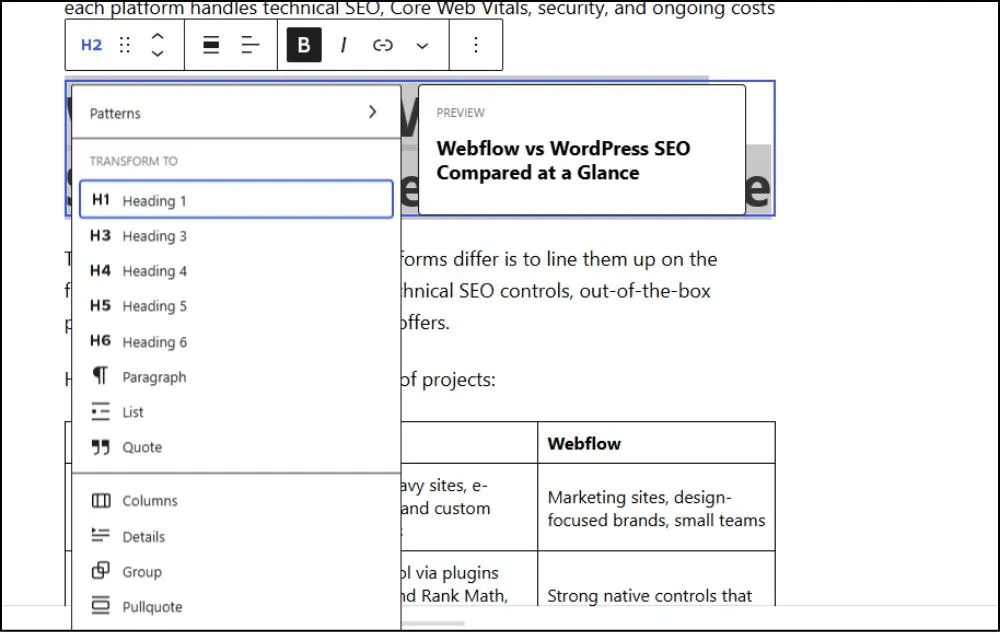
- Heading blocks let writers set H1 through H6
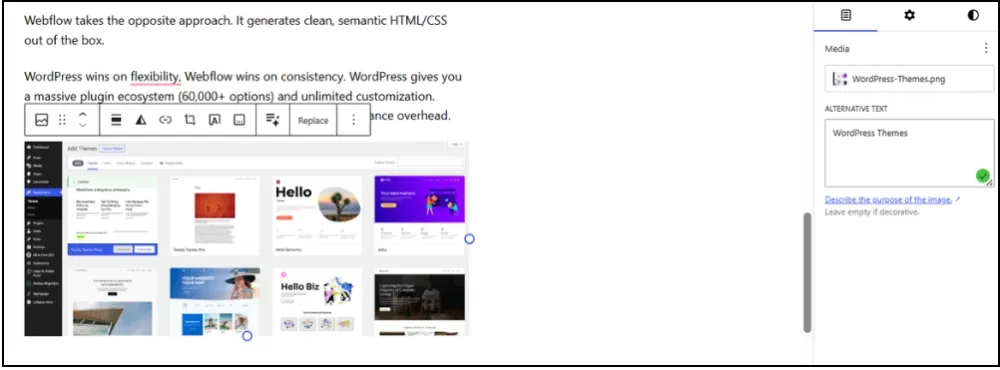
- The media library includes alt text fields for every image
- The link picker allows internal linking to any published post or page
None of this requires a plugin. It does require writer discipline, since WordPress doesn't enforce heading hierarchy or flag missing alt text.
Everything else requires plugins.
- Canonical tag management
- robots.txt editing
- 301 redirects
- schema markup
- meta description fields
- Open Graph tags
- breadcrumbs
- hreflang tags
- and internal linking suggestions
This setup works best for teams that want control over every output and have someone comfortable configuring plugins and deciding which one owns each tag. For a hands-on owner or an in-house developer, that flexibility is the appeal. For a non-technical team, the upfront configuration and ongoing upkeep are real costs to weigh before committing.
What SEO Plugins Work Best for WordPress Sites?
I've tested all three major SEO plugins extensively across client sites. Each has distinct strengths depending on your situation.
| Plugin | Free Features | Premium Cost | Best For |
|---|---|---|---|
| Yoast SEO | Meta tags, XML sitemaps, breadcrumbs, and content analysis | $118.80/year | Sites that need reliable on-page basics with a clean handoff to writers |
| Rank Math | Schema builder, local SEO, 404 monitoring, Search Console integration | $59–$69/year | Sites that need structured data depth without paid plugins |
| All in One SEO | TruSEO score, WooCommerce integration, smart sitemaps | $49.50/year | Ecommerce stores and non-technical owners |
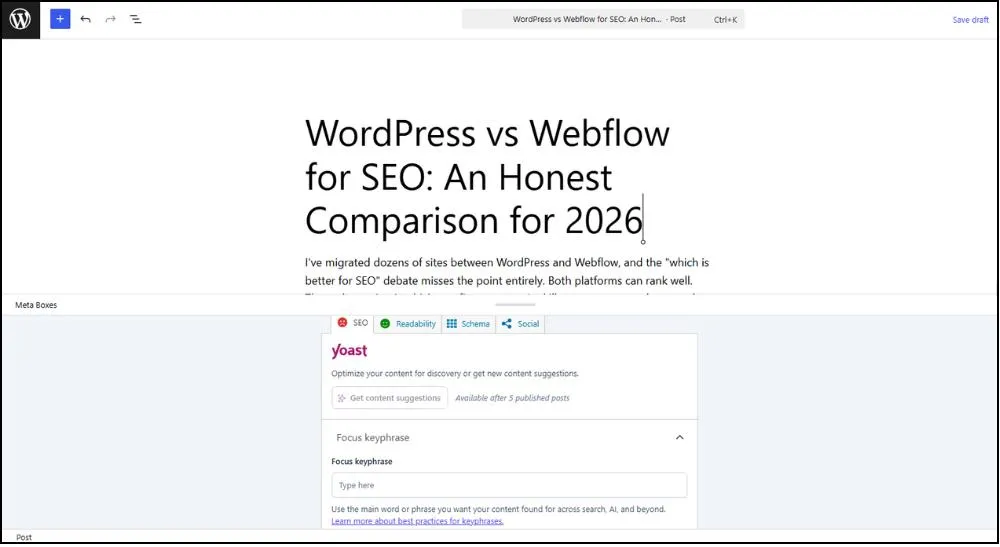
- Yoast SEO covers the on-page basics most cleanly. Meta titles, descriptions, focus keyword analysis, and the writing-focused interface make it the easiest plugin to hand off to a content team without ongoing training. The readability and SEO score sidebar runs inside the post editor, so writers see issues before publishing.
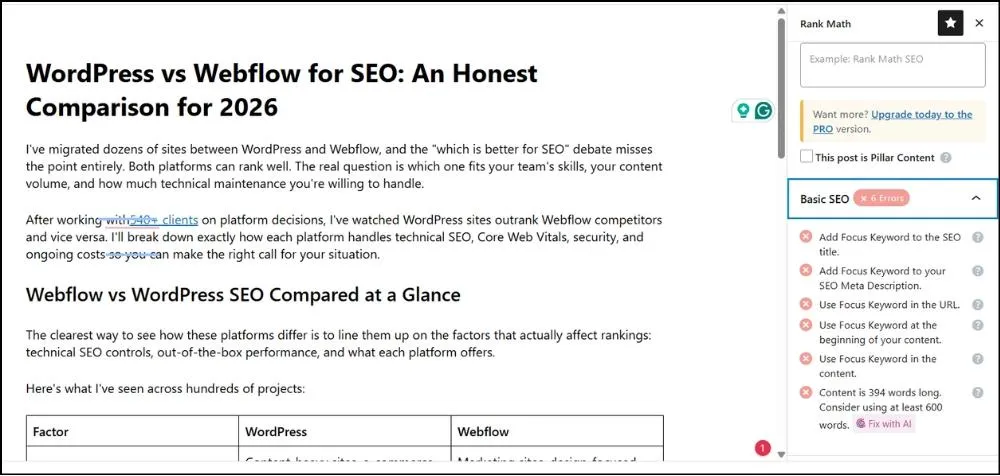
- Rank Math closes the structured data gap better than the other two. Its free tier includes a visual schema builder for Article, Product, FAQ, HowTo, and Local Business types, which would cost extra elsewhere. For sites that depend on rich results, this is often where I point clients first.
- All in One SEO does the ecommerce job better than the alternatives. The WooCommerce integration handles product schema, sitemaps, and category page optimization without extra configuration. The interface is cleaner than Yoast's, which matters when a non-technical owner is the one updating products.
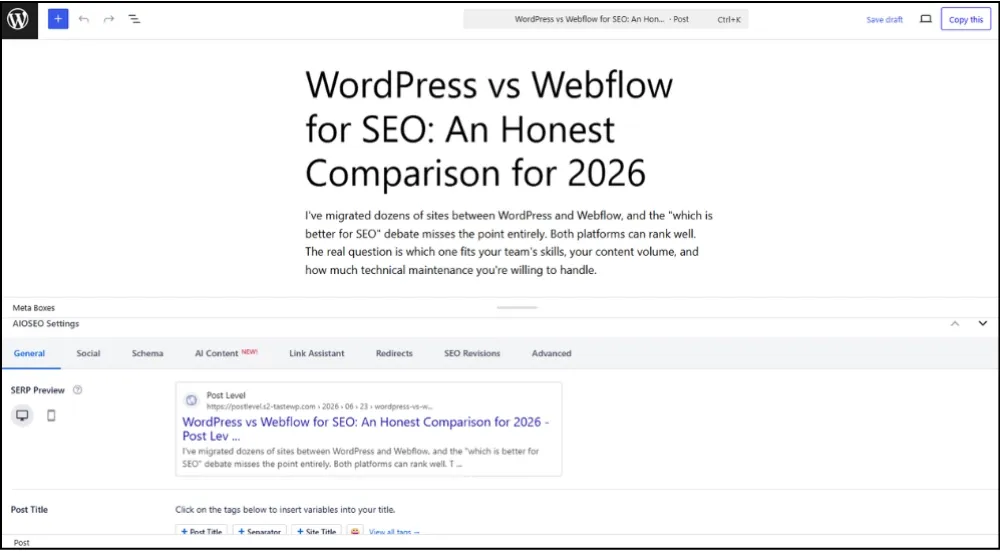
Where WordPress Falls Short on SEO
I've audited hundreds of WordPress sites, and the same problems keep appearing. The plugin model creates conflicts when multiple plugins write the same tags (canonicals, schema, Open Graph) in ways that only show up in audits.
On-page elements like heading hierarchy, alt text, and internal linking aren't enforced, so they depend on the writer's discipline. Defaults like archive pagination and the "?p=123" permalink format also bite inherited sites and need fixing before they cost you SEO equity.
How Does Webflow Handle On-Page and Technical SEO?
Webflow takes the opposite approach to WordPress. Instead of relying on plugins for the basics, the SEO controls are built into the platform. I've found this works well for teams without a dedicated developer who still want a strong technical foundation.
The first thing I notice when I work on a Webflow site is the code quality. Webflow generates semantic HTML5 and clean CSS without the bloat I see from WordPress page builders. No plugin injected scripts, no redundant markup. Cleaner code means faster crawling and better indexing.
What SEO Settings Does Webflow Include?
Webflow's SEO panel covers what most sites need without touching code. I group the native controls into three buckets:
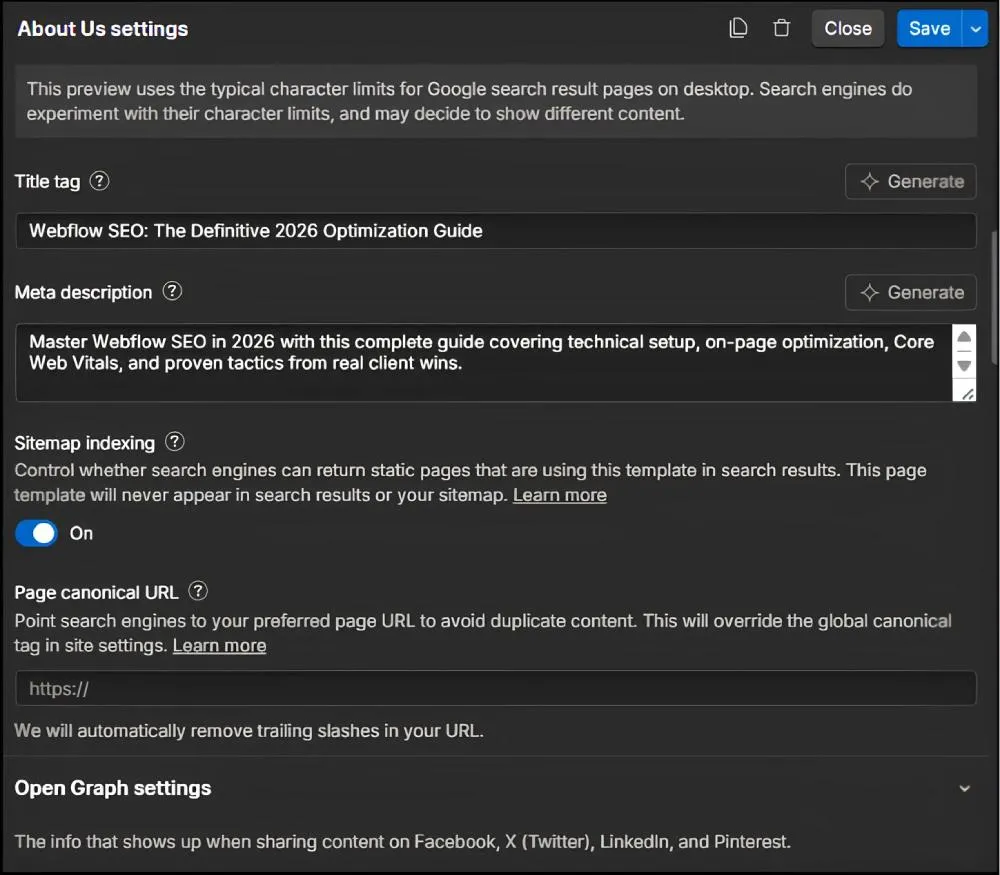
- Page-level controls: Title tag with a 60-character counter, meta description with a 160-character counter, Open Graph settings for social sharing, and canonical URL specification.
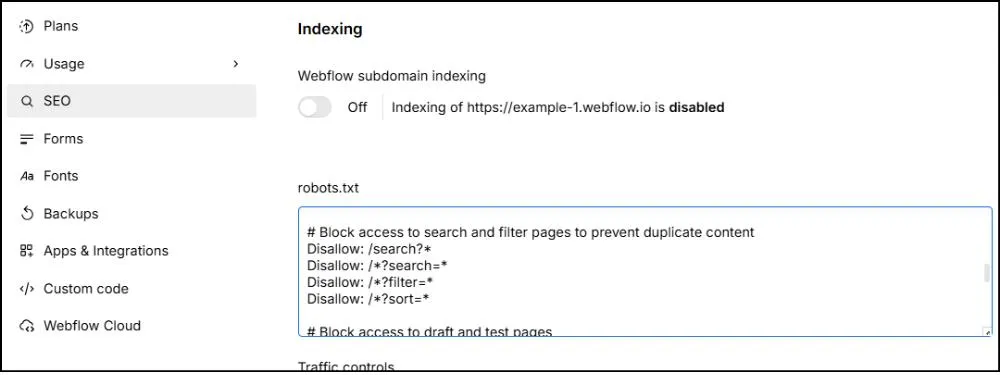
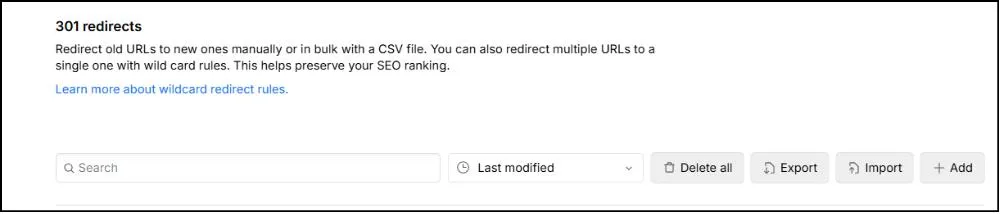
- Site-level settings: Auto-generated XML sitemap that updates on publish, robots.txt editor, and a 301 redirect manager with CSV bulk upload support.
- Image SEO: Alt text fields integrated into the asset manager, plus automatic responsive image generation in modern formats.
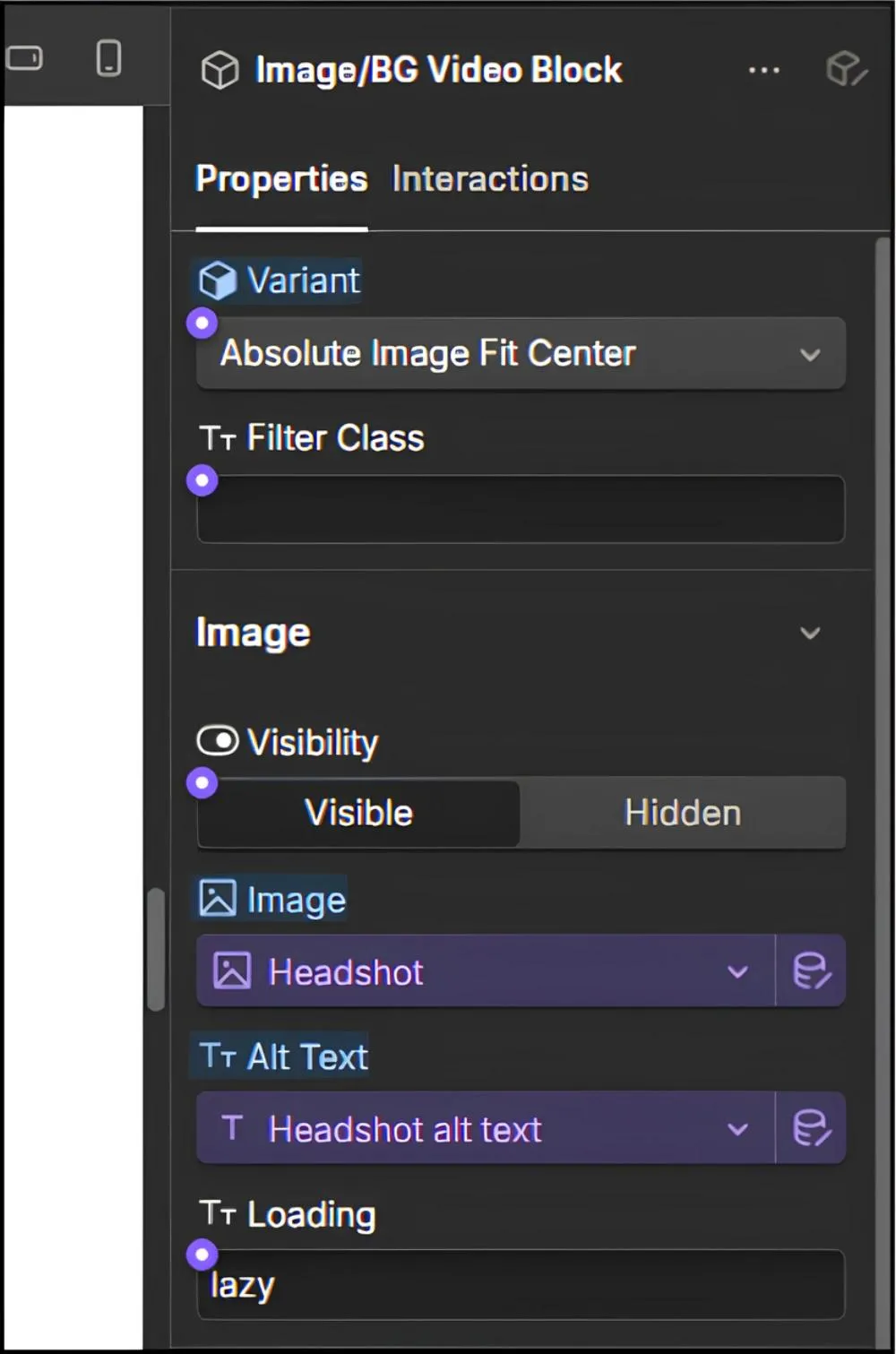
For anything beyond the basics, the Webflow app marketplace covers 300+ apps. Schema Flow and Flowtrix Schema add visual structured data builders for richer schema control, Finsweet Attributes adds advanced CMS functionality, including schema and SEO attributes, and Semflow runs on-page SEO scoring inside the designer. The marketplace is smaller than WordPress's plugin directory, but the apps I rely on are stable and well-maintained.
This setup works best for teams that want a strong technical foundation without having to manage it themselves. If you're a marketing team without a dedicated developer, having the controls built in and consistent is exactly the appeal. The thing to weigh is depth. If you need advanced configuration beyond what the native panel and marketplace apps cover, you may hit ceilings that a WordPress plugin stack wouldn't have.
What Makes Webflow Faster and Easier to Crawl?
Webflow's performance advantage comes from two places: managed hosting and the code itself.
Hosting is included and tuned for performance. You get Fastly CDN, automatic SSL, global edge caching, and optimized asset delivery. No configuration required.
The code is the other half. Webflow gives me cleaner tools for three things I keep fixing on WordPress sites:
- Heading hierarchy: The designer enforces H1 through H6 structure, so a writer can't accidentally drop an H3 without an H2 above it.
- Semantic tags: Article, section, and nav elements are used by default, which gives crawlers cleaner signals about page structure.
- ARIA labels: Accessibility attributes are baked into common interactive elements, which helps both screen readers and search engines understand the page.
There's also no jQuery dependency like many WordPress themes carry, and scripts only load for interactions I actually build. Technical maintenance items handle themselves, too. Sitemaps update when I publish, robots.txt is accessible at /robots.txt, and SSL certificates renew on their own. The maintenance mistakes I see most often on WordPress (an outdated sitemap, an expired SSL) don't happen here because no one has to remember to do them.
Where Webflow Falls Short on SEO
Webflow keeps things simple, which works in its favor most of the time. The places where it shows: the native schema builder is AI-assisted but still limited compared to Rank Math's visual editor, the redirect manager doesn't support regex or wildcards, and there are some ceilings around faceted navigation or programmatic SEO on very large sites. None of this affects the typical marketing site, but it's worth knowing if you're planning something bigger or more complex.
What Technical SEO Factors Actually Impact Rankings?
Google doesn't care what you build with, but bad implementation hurts on either platform. John Mueller, Google's Search Advocate, has confirmed this directly. He's said Google's search systems don't treat any specific CMS differently and that there's no fundamental SEO difference between mainstream platforms. What matters is execution, not the platform you choose.
The ranking-critical elements are
- Canonical tags (prevent duplicate content issues)
- Schema markup (enable rich snippets in search results)
- XML sitemaps (ensure complete indexing)
- Page speed (Core Web Vitals became a ranking signal in 2021)
Sites that meet the thresholds of LCP under 2.5 seconds, INP under 200 milliseconds, and CLS under 0.1 see small ranking benefits, and a 1-second delay in load time can drop conversions by up to 7%.
How Do Canonical Tags Prevent Duplicate Content Issues?
Canonical tags tell Google which version of a page to index when similar content exists at multiple URLs. This matters because duplicate content dilutes your ranking signals and confuses search engines about which page to show.
WordPress approach: Yoast and Rank Math auto-generate canonicals for posts and pages, with manual override available. The pitfall I see constantly is multiple plugins setting canonicals on the same page. Your theme, your SEO plugin, and your page builder might all try to generate them, and they don't always agree.
Webflow approach: The canonical URL field lives in page settings, and CMS collections auto-canonicalize to the primary template. Edge cases need manual configuration, but the single source of truth prevents the conflict problem I see on WordPress.
Schema markup is where WordPress pulls ahead in depth. Rank Math's visual schema builder handles Article, Product, FAQ, HowTo, and Local Business types without code. Webflow has AI-assisted native schema as of 2026, plus marketplace apps like Schema Flow and Flowtrix Schema, but the depth still doesn't match Rank Math.
| Schema Type | WordPress | Webflow |
|---|---|---|
| Article | Auto-generated by Yoast or Rank Math | AI-assisted native, or Schema Flow / Flowtrix |
| Product | WooCommerce handles natively | App needed for full control |
| FAQ | Rank Math visual builder | Schema Flow or Flowtrix |
| Local Business | Rank Math visual builder | Manual JSON-LD or app |
How Do Sitemaps, Robots.txt, and URLs Compare?
Sitemaps: WordPress core generates a basic sitemap at /wp-sitemap.xml. Yoast and Rank Math create enhanced sitemaps with image URLs, video sitemaps, and news sitemaps. Large sites with 10,000+ pages may need sitemap splitting to stay under Google's per-file limits. Webflow sitemaps auto-generate at /sitemap.xml and update on publish. The limitation is customization. You can't exclude specific pages without using noindex, and there's no native support for video or image sitemaps.
Robots.txt: Both platforms allow editing. WordPress handles it through a plugin or a server file, and Webflow uses the site settings panel. WordPress gives me more control; Webflow gives me less room for error.
URL structure: WordPress lets me customize permalinks fully. Category and tag slugs are editable, and custom post types support unique URL patterns. Webflow keeps slugs customizable, too, but CMS collection URLs follow template patterns, which limits flexibility for complex hierarchies on large sites.
Redirects: This is where WordPress pulls ahead. Plugins like Redirection and Rank Math offer regex support, wildcard redirects, and redirect chain detection. Webflow supports 301 redirects via CSV upload, but no regex or wildcard support, which adds manual work on platform migrations.
How Does Multilingual SEO Work on Each Platform?
Hreflang tags signal language and region targeting to Google. Getting this wrong means your French content might show up for English searchers, which hurts both user experience and rankings.
WordPress multilingual: WPML and Polylang plugins handle hreflang automatically. Separate URLs per language (/en/, /fr/) or subdomains. Translation management is built in with workflow features for teams.
Webflow multilingual: Webflow Localization creates language-specific versions with auto-generated hreflang tags. The visual translation interface makes it easy for non-technical users. Limited to Webflow hosting.
What About Faceted Navigation and Crawl Budget?
E-commerce and directory sites generate thousands of filter combinations (/products?color=red&size=large). Faceted navigation refers to filter-based URLs that let users narrow product listings. Without controls, Google wastes crawl budget on low-value pages that don't deserve indexing.
WordPress solutions: Yoast SEO Premium offers faceted navigation controls. Custom robots.txt rules and canonical tags to primary category pages work. Requires developer configuration but gives you full control.
Webflow limitations: No native faceted navigation controls. Requires custom code or Cloudflare Workers to block parameter URLs. For e-commerce sites with complex filtering, this is a significant gap.
How Do Core Web Vitals Affect SEO Performance?
Core Web Vitals measure user experience. Google confirmed them as a ranking signal, though the weight is modest compared to content quality and backlinks. Still, poor performance creates real problems beyond rankings: 53% of mobile users abandon sites taking over 3 seconds to load.
There are three metrics to know, with thresholds defined by Google's official Core Web Vitals report:
- LCP (Largest Contentful Paint): measures loading speed. Good is under 2.5 seconds.
- INP (Interaction to Next Paint): measures responsiveness. Good is under 200 milliseconds.
- CLS (Cumulative Layout Shift): measures visual stability. Good is under 0.1.
How to Fix Core Web Vitals on Each Platform
On WordPress, the same problems keep showing up in audits: slow hosting (especially shared plans), heavy page builders that load extra JavaScript on every page, large unoptimized images, and plugin stacks that fight each other for resources. Performance plugins help, but they only patch the surface.
| Plugin | Primary Function | Cost |
|---|---|---|
| WP Rocket | Caching, lazy loading, minification, and database optimization | $59/year (single site) |
| W3 Total Cache | Page, browser, and database caching with CDN integration | Free (Pro available at $99/year) |
| LiteSpeed Cache | Server-level caching plus image, CSS, and JS optimization | Free (server-level caching requires LiteSpeed hosting) |
WP Rocket is my go-to recommendation for most clients. The configuration is straightforward, and it handles the major performance optimizations without requiring technical expertise. W3 Total Cache works well but has a steeper learning curve.
On Webflow, the platform handles most of the work. Fastly CDN, automatic image optimization, responsive image generation, and compression all run by default. Where Webflow sites do fail Core Web Vitals, the cause is almost always custom embeds, heavy third-party scripts, oversized hero images, or excessive animations. The platform can't compensate for those choices, but it gives the typical marketing site a strong starting point with no configuration required.
How Do Security Vulnerabilities Affect SEO?
Security incidents hurt SEO directly. I've seen sites deindexed after malware infections, spam pages dilute domain authority, and downtime wastes crawl budget. This isn't theoretical. It happens regularly to sites that don't keep their stack updated.
The risk profile is different on each platform. Wordfence reports that the average WordPress site is attacked once every 33 minutes, with around 45 probing requests per day looking for weak passwords, vulnerable plugins, or other entry points. The exposure isn't theoretical: most WordPress security issues come from third-party plugins and themes rather than core, and the plugin ecosystem is large enough that any sizeable site is running at least one component with a known issue at any given time. Update discipline is the single biggest factor in keeping a WordPress site safe.
Webflow keeps the attack surface small. There are no plugins to vet, security updates run automatically, and SSL renews itself. You can't configure security at the server level, but most teams are happy not to.
What Does SEO Maintenance Look Like on Each Platform?
WordPress maintenance burden is real. Weekly plugin updates (15-30 min), monthly security patches, quarterly performance audits, and annual major version updates. This requires technical knowledge or a developer retainer. I've seen too many WordPress sites fall behind on updates and suffer the consequences.
Webflow maintenance is lighter. Platform updates are automatic. No plugin management. SEO maintenance focuses on content optimization and monitoring rather than technical upkeep.
What Ongoing Tasks Does WordPress SEO Require?
- Weekly tasks (15-30 min): plugin/theme updates, broken link checks, uptime monitoring, security scan review. These aren't optional if you want to maintain performance and security.
- Monthly tasks: performance audit (PageSpeed Insights, GTmetrix), Search Console error review, backup verification, and content optimization based on analytics. This is where you catch problems before they become serious.
- Quarterly tasks: full SEO audit (technical crawl, backlink analysis), plugin inventory cleanup, and hosting performance review. Regular audits prevent the gradual degradation I see on neglected WordPress sites.
How Does Webflow Reduce Maintenance Overhead?
- Automated by Webflow: platform updates, security patches, SSL renewal, CDN optimization, backup management. You don't schedule these tasks because they happen automatically.
- Your remaining SEO tasks: content optimization (meta tags, headings, internal linking), Search Console monitoring, backlink outreach, and performance monitoring. The work shifts from technical maintenance to strategic optimization.
I estimate 5-10 hours/month saved versus WordPress on technical maintenance. That time can go toward content creation or link building instead.
How Do WordPress and Webflow Compare on Design?
Most people choosing a platform care about how their site will look, not just how it ranks. Both can produce a professional, modern site. They just get you there differently.
WordPress builds its design around themes:
- The official directory has over 14,000 free themes, plus thousands more premium options from third-party marketplaces
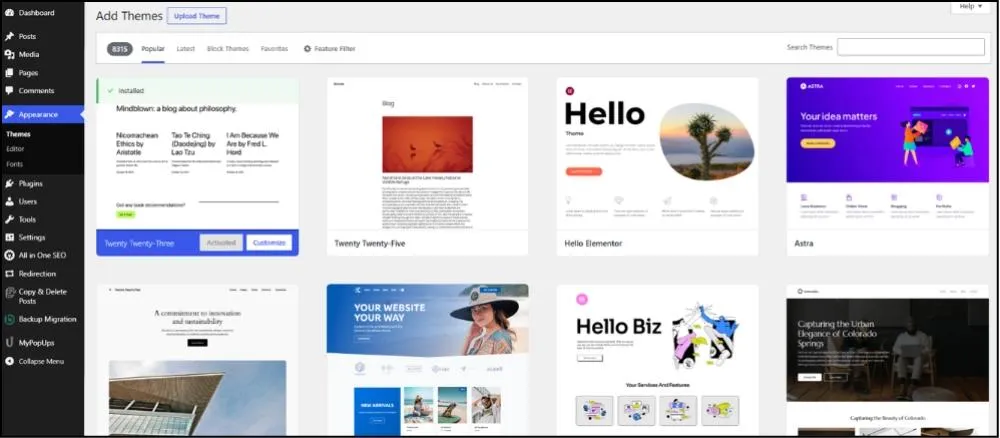
- You pick a theme as your starting point and customize it from there
- Page builders let you adjust layouts visually without writing code. Lighter options like Gutenberg and Blocksy keep output relatively clean, while builders like Elementor, Divi, and WPBakery offer more drag-and-drop flexibility (though they may make the site a little bit heavier if not managed carefully)
- The block editor now lets you reshape headers, footers, and full pages on block-based themes
The thing I see trip people up is that how good the result looks depends heavily on which theme you start with, how well it is coded, and how far you push the builder. Two sites on the same theme can end up looking very different, and a truly custom design usually means bringing in a developer or designer.
Webflow builds design around visual canvas:
- Instead of starting from a theme, you lay out a page element by element and see exactly what you are building as you go
- You get control down to the pixel, plus responsive adjustments across breakpoints
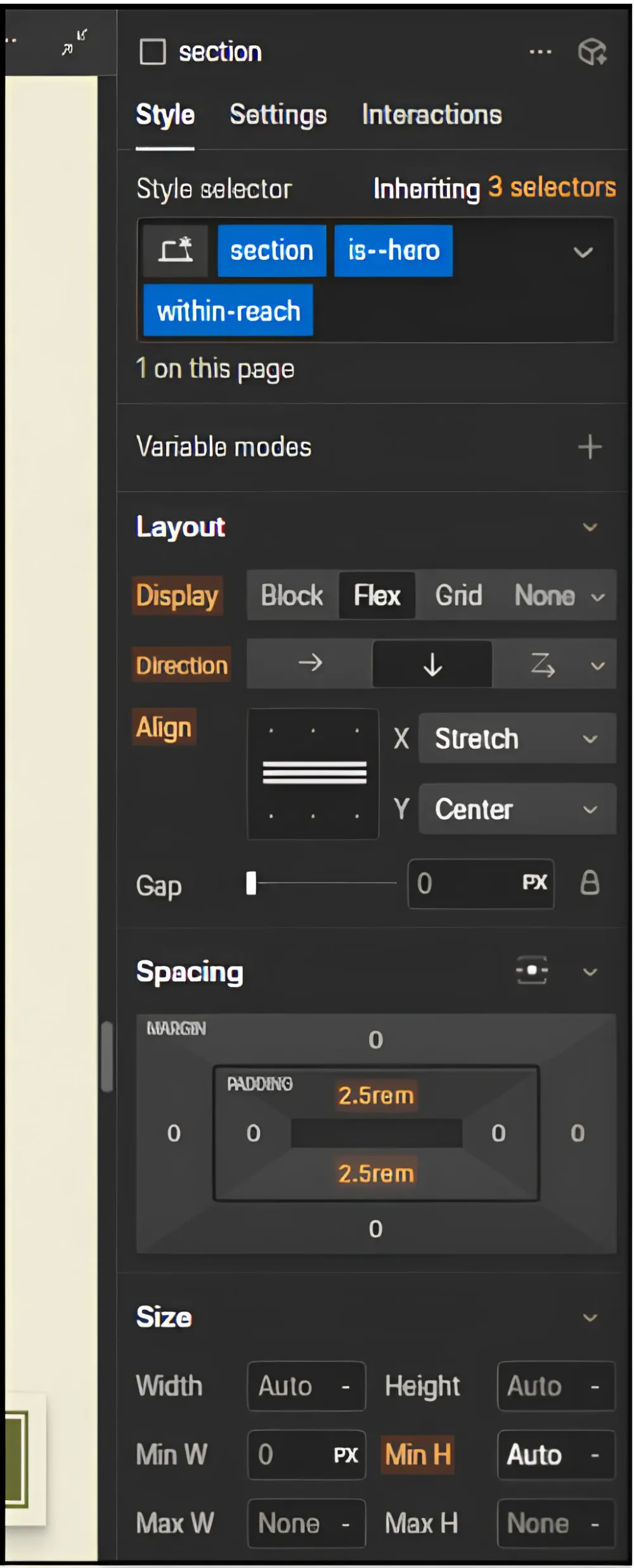
- Animations and interactions are built into the platform
- The template marketplace has thousands of free and paid templates if you want a head start, though plenty of teams build from scratch
This is why design-led brands and agencies often lean toward it: what you picture is usually what you can build, without working around a theme's limits.
To sum up:
- Choose WordPress if you want a large library of ready-made looks and room to customize them. It fits teams that want a quick starting point or have a developer to refine the details.
- Choose Webflow if you want precise visual control from a blank canvas. It fits teams that want a distinct, custom design and plan to build it themselves.
When Is WordPress Better For SEO?
WordPress wins when you require maximum flexibility and have the resources to manage it. The platform excels in scenarios where its ecosystem depth and customization options outweigh the maintenance overhead.
Ideal use cases:
- content-heavy sites (10,000+ pages)
- multi-author blogs with editorial workflows
- e-commerce with complex product catalogs
- sites requiring custom integrations
- and organizations with in-house dev teams
How Does WordPress Handle Content at Scale?
WordPress excels at high-volume content publishing. Gutenberg's block editor supports reusable content blocks. Custom post types organize content beyond posts and pages. User roles (editor, author, contributor) enable team workflows with appropriate permissions.
Programmatic SEO works well on WordPress. Custom post types plus taxonomies enable database-driven content (city pages, product variations, directory listings). If you're building thousands of pages from data, WordPress handles this better than Webflow.
In one case, we helped Mindfulness Exercises grow from 13,826 to 103,285 monthly organic visitors, a 647% increase, by optimizing their WordPress site's content structure. We removed 250 low-quality URLs, created thematic content silos targeting keywords with 145K monthly search volume, and implemented a parent-child internal linking structure. The site achieved these results without any link-building efforts, purely through strategic content optimization and site architecture improvements.
What Customization Options Does WordPress Offer?
WordPress has a massive developer community. WordPress.org forums, Stack Overflow, extensive documentation, thousands of tutorials. Finding help is easy.
Custom plugins handle unique features. Themes can be built from scratch. The REST API supports headless implementations for teams that want WordPress as a content backend with a custom frontend. The flexibility is what makes WordPress the default choice for projects with specific technical requirements.
When Do You Need WordPress Plugin Functionality?
- E-commerce complexity: WooCommerce powers over 6 million stores globally and is the most widely deployed open-source e-commerce platform. Extensions handle subscriptions, memberships, bookings, and multi-vendor marketplaces. The ecosystem is mature and well-supported.
- Membership and community: BuddyPress for social networking, bbPress for forums, and MemberPress for paid memberships handle scenarios that Webflow doesn't have direct equivalents for. These are niche use cases, but where they apply, WordPress is the clearer choice.
When Is Webflow Is Better For SEO?
Webflow wins when you want predictable performance without technical overhead. The platform excels for teams that prioritize design quality and don't want to manage infrastructure.
We saw this work for Fiducia Adamantina, a Dubai-based M&A and private equity consultancy. We built the site from scratch on Webflow, designed the UX in Figma, optimized service pages for UAE search intent, and acquired 123 backlinks from 86 domains. The site grew from zero to 203 monthly organic visits, the domain rating jumped 1,600%, and top-10 keywords increased 1,700%.
Ideal use cases:
- marketing sites (5-500 pages)
- design-focused brands
- teams without dedicated developers
- projects prioritizing speed-to-market
Why Do Design-Focused Brands Choose Webflow?
Webflow offers pixel-perfect layouts without code. Responsive design across breakpoints. Custom animations and interactions. Designers can build exactly what they envision.
Performance comes by default: clean code output, integrated CDN, automatic image optimization, and Brotli compression. You focus on design while Webflow handles the technical foundation.
How Does Webflow Work for Teams Without Developers?
The technical barrier is lower. Visual interface for all SEO settings. Automatic updates. Managed hosting. You don't need to understand server configuration or plugin conflicts.
No plugin conflicts to troubleshoot. No security vulnerabilities to patch. The platform handles the complexity, so your team can focus on content and design.
What Projects Benefit from Minimal Maintenance?
Set-and-forget infrastructure: automatic platform updates, security patches, SSL renewal, CDN optimization, backup management. Webflow handles everything technical.
Stable performance without plugin updates, causing conflicts or regressions. What works today will work tomorrow without intervention.
Our Verdict on Webflow vs WordPress for SEO
There's no universal winner. I've helped clients succeed on both platforms, and I've seen both fail when mismatched to the wrong situation. The platform matters less than execution.
| Scenario | Recommended Platform | Key Reasoning |
|---|---|---|
| SaaS marketing site | Webflow | Clean design, fast performance, low maintenance |
| Ecommerce with 5,000+ products | WordPress | WooCommerce ecosystem, faceted navigation control |
| Multi-author blog with editorial workflows | WordPress | Custom post types, mature role, and permission system |
| Lean marketing teams without developers | Webflow | Visual builder, included hosting, no plugin maintenance |
| Enterprise sites with in-house dev teams | WordPress | Maximum customization, REST API for headless setups |
| Portfolio or small business | Webflow | Visual builder, predictable performance, and included hosting |
- WordPress is the better fit for e-commerce with 5,000+ products, multi-author blogs with editorial workflows, and enterprise sites with in-house dev teams.
- Webflow is the better fit for SaaS marketing sites, lean marketing teams without developers, and portfolio or small business sites.
The difference between a site that ranks and one that doesn't comes down to implementation choices, not platform limitations. Pick the platform that matches your team's skills and your project's requirements, then execute well.
Pick the platform that matches your team's skills and your project's requirements, then execute well. If you need help deciding which platform fits your specific situation or want expert guidance on WordPress SEO and Webflow SEO, we're here to help you make the right choice.
References
- https://www.loopexdigital.com/
- https://httparchive.org/reports/techreport/tech?geo=ALL&rank=ALL&tech=WordPress
- https://httparchive.org/reports/techreport/tech?median-lighthouse-over-time=seo&tech=Webflow
- https://w3techs.com/technologies/comparison/cm-wordpress
- https://w3techs.com/technologies/details/cm-webflow
- https://www.wpzoom.com/blog/wordpress-statistics/
- https://make.wordpress.org/core/2020/07/22/new-xml-sitemaps-functionality-in-wordpress-5-5/
- https://wordpress.org/extend/plugins/
- https://yoast.com/
- https://rankmath.com/
- https://aioseo.com/
- https://webflow.com/apps
- https://www.fastly.com/products/cdn
- https://webflow.com/blog/how-to-use-aria
- https://www.searchenginejournal.com/does-the-cms-matter-for-search-rankings/457580/
- https://developers.google.com/search/blog/2020/11/timing-for-page-experience
- https://www.liveseysolar.com/website-speed-study-finds-1-second-delay-in-website-load-time-means-a-7-reduction-in-conversions/
- https://webflow.com/integrations/schema-flow
- https://webflow.com/apps/detail/schema-flow
- https://webflow.com/apps/detail/flowtrix-schema
- https://wordpress.org/plugins/redirection/
- https://wordpress.org/plugins/woocommerce-multilingual/
- https://wordpress.org/plugins/polylang/
- https://developers.google.com/search/docs/appearance/core-web-vitals
- https://www.motionbuzz.com/blog/site-speed-important-seo-factor/
- https://support.google.com/webmasters/answer/9205520?hl=en
- https://webflow.com/blog/the-fastest-cheapest-website-hosting-service
- https://www.wordfence.com/
- https://www.cloudways.com/blog/woocommerce-statistics/
Maria Harutyunyan is the Co-founder and Head of SEO at Loopex Digital. She specializes in general SEO and strategy for SaaS, e-commerce, and B2B brands. An expert in on-page (onsite) SEO with more than 10 years in search, she is recognized by the SEO community as one of the top voices in the field. She has been featured in Forbes, quoted as an SEO expert on Shopify, and writes for Convince & Convert, SE Ranking, and Mangools (KWFinder). She is also the founder of Armenia's first SEO Academy, having trained 500+ marketers.
Submit the form - Get Free Proposal
%202.png)
24 hours
Don’t forget to share this post!
Latest Articles





Submit the form - Get Free Proposal
24 hours

