
CSR vs SSR Render Detector by Loopex Digital: A New Free Chrome Extension for SEOs to Instantly See What’s Server-Rendered and What’s JavaScript-Rendered


Ever wondered whether the content on a page was already in the HTML or only appeared after JavaScript ran? That's exactly why we built CSR vs SSR Render Detector.
CSR vs SSR Render Detector is a free Chrome extension built by Loopex Digital that fetches a page's raw HTML - the same document a server sends before a single line of JavaScript executes - and compares it against the live, fully rendered DOM in your browser. Anything present in that raw HTML - whether it's server-rendered, statically generated, or plain static markup - gets highlighted in green and labeled SSR for simplicity. Anything that only exists because JavaScript built it afterward gets highlighted in orange and labeled CSR (Client-Side Rendered).

The result is a webpage you can look at and immediately understand, element by element, what was already there in the server's response and what JavaScript added or built afterward.
Why Loopex Digital Created CSR vs SSR Render Detector
We built CSR vs SSR Render Detector because we needed it ourselves. Comparing "View Source" against DevTools by hand was slow and easy to get wrong. Now that same check takes seconds - fast, easy, and shareable straight to a developer or client.
What CSR vs SSR Render Detector Checks
CSR vs SSR Render Detector checks whether the elements that matter the most for SEO are Server-Side Rendered (SSR) or Client-Side Rendered (CSR). It specifically checks:
- Headings (H1–H6) - to determine your primary keyword-carrying headings are actually in the server response, not assembled after load
- Paragraphs and body text - the core readable content search engines and AI crawlers use to understand the page
- Images and videos - to confirm your visual content is present in the server response, not injected after load
- Links - navigation, footer, and inline links; if a link only exists after JavaScript runs, it may never get discovered and followed during the crawl phase
- Buttons and form elements - relevant for functional and conversion-path audits
- List items and table cells - often overlooked, and commonly loaded via JavaScript in review widgets and testimonial sections
- Blockquotes and labels - easy to miss, worth checking in review widgets and testimonial sections where third-party embeds often rely on JavaScript
How CSR vs SSR Render Detector Works
Click the extension icon, then hit Enable Detection to turn the extension on and start working. Once it's active, you'll see two detection modes: Highlight All and Inspect - choose whichever one you want to use. From there, you'll find a couple of other functions to control how the tool behaves as you browse.

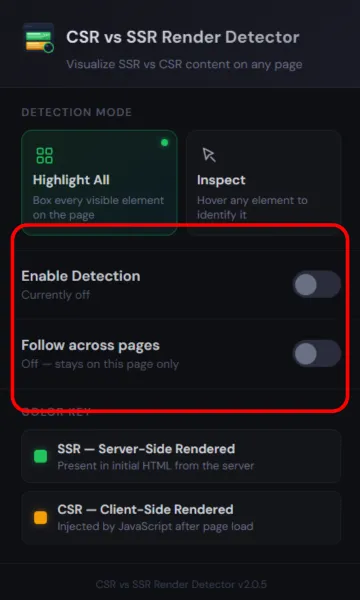
Highlight All Function
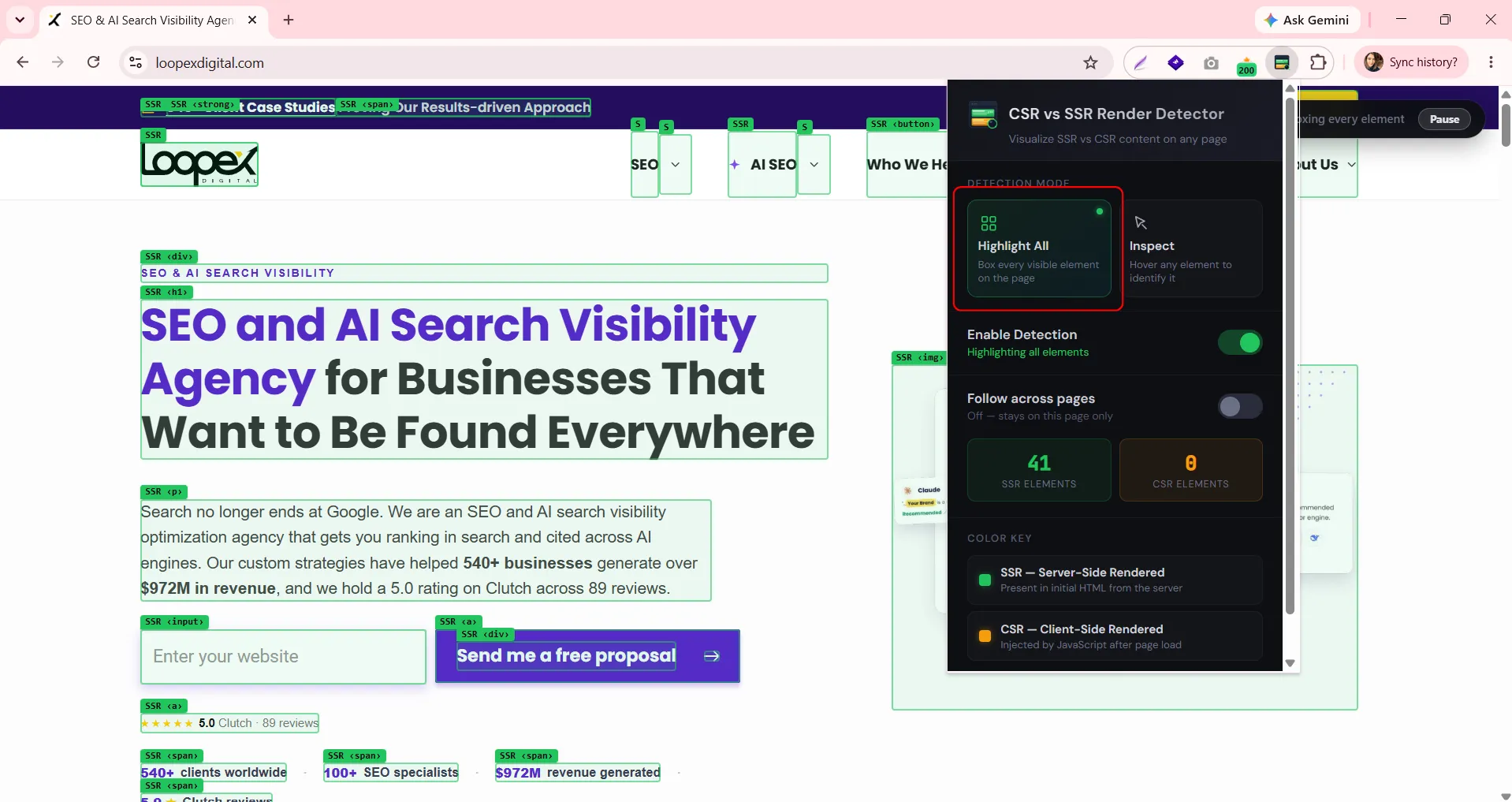
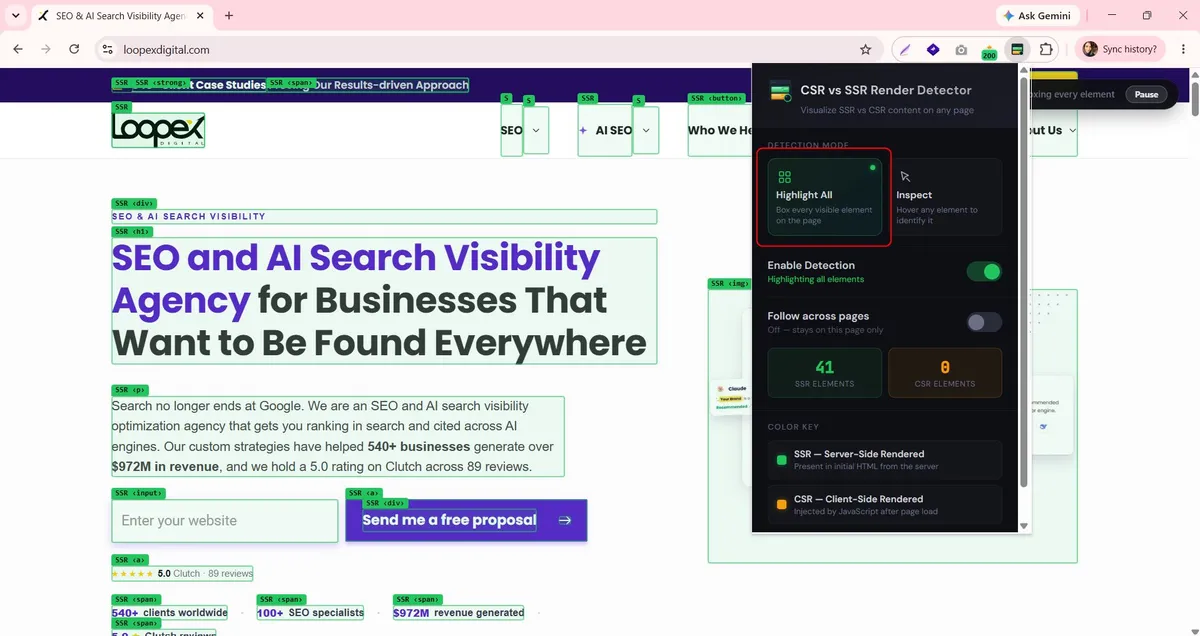
Highlight All function boxes every visible element on the page at once, labeling each one with its tag name and rendering type (e.g., SSR ‹h1›, CSR ‹p›). It automatically picks up heading tags (h1, h2, h3, and so on) and paragraph tags across the page, along with links, images, buttons, and the other elements listed below - so you don't have to manually select anything to get a full picture of a page's rendering strategy in one glance.
In the image above, highlight all function is running on a real homepage. Every heading, paragraph, button, and image gets its own colored border and label - SSR in green, CSR in orange - so you can scan the whole layout and immediately see which sections are baked into the server response and which ones are assembled by JavaScript after load.
Inspect Function
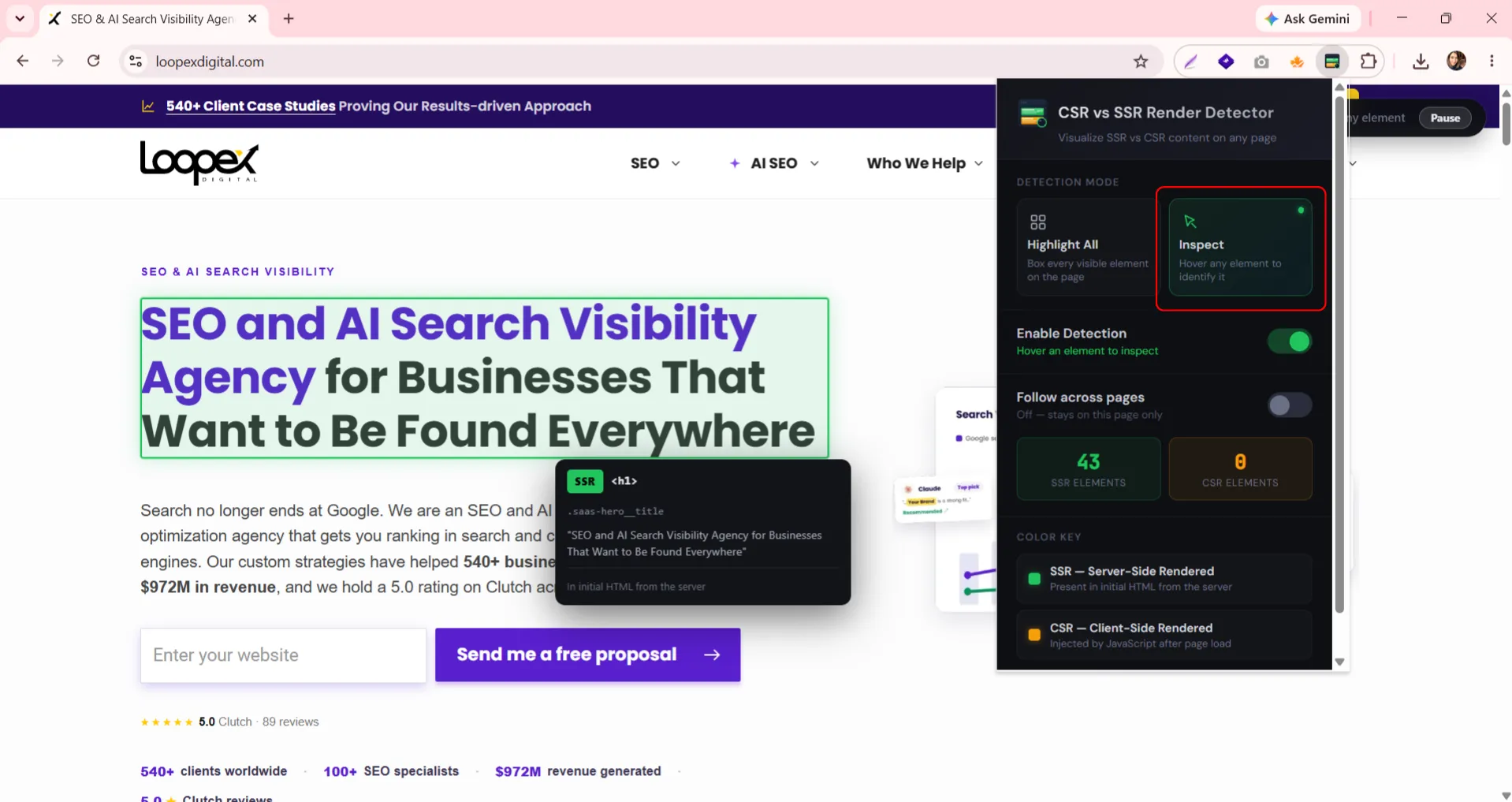
Instead of highlighting everything simultaneously, this mode lets you hover over individual elements one at a time. A small tooltip appears showing the element's rendering type, its tag, its CSS class, the actual text or content detected, and a plain-language note on where it came from.
Switching to Inspect mode and hovering over a navigation link reveals exactly what the tool is checking under the hood: the tag (<a>), the CSS class (.lpx-link), the text content ("Content"), the rendering type (SSR), and confirmation that it was found in the initial HTML from the server.
Follow across pages
Keeps detection active as you navigate from page to page on the same site, so you don't have to re-enable it every time you click a link. Turn this on and Chrome will ask you to confirm once; after that, CSR vs SSR Render Detector quietly reads each new page's HTML to sort SSR from CSR content, without collecting or transmitting anything.
Pausing on Demand
Detection can be paused at any moment without turning the whole extension off or losing your "Follow across pages" setting - useful when you want to stop the highlighting temporarily to read the actual page content or take a clean screenshot.

Watch the full tutorial below.
The extension in practice
E-commerce sites are one of the clearest places to see why this distinction matters. On this backpack category page, the heading and product images are marked SSR - they're present in the raw HTML. The category filters, though, are inconsistent: Backpacks, Accessories, and School on Sale come through as SSR, while Shoes and Clothing are CSR. And the product cards tell the real story - every price, discount percentage, and product title is marked CSR, meaning it's injected by JavaScript after the initial page load, even though the product image sitting directly above it was already there in the HTML.

If a crawler - particularly a non-rendering AI crawler, or Googlebot before its rendering pass completes - only reads the raw HTML, it would see the category name and the product photos, but miss the prices and product names entirely. For a retailer relying on organic and AI-driven search traffic to surface product listings, that's a meaningful visibility gap that would be nearly impossible to catch just by eyeballing the page.
Who is the extension for
CSR vs SSR Render Detector is an essential tool for SEO specialists, technical SEOs, and developers who need to verify - not assume - what's actually present in a page's raw HTML.
It doesn't just tell you that a page uses JavaScript. It shows you, tag by tag, exactly which headings, links, images, buttons, prices, and text blocks are server-rendered versus injected client-side after the page loads.
You install it from the Chrome Web Store, click the icon on any page, and the extension does the comparison for you - no dev tools tab juggling, no manually diffing "View Source" against the Elements panel. Here is where it can be helpful:
- SEO auditing - Before you assume a page's content is fully visible to crawlers, verify it. CSR vs SSR Render Detector lets you confirm that key headings, body copy, and internal links are actually present in the initial HTML rather than relying on JavaScript execution that a crawler might delay, skip, or fail to complete.
- Performance debugging - Heavy client-side rendering isn't just an SEO risk; it's a performance one. Seeing how much of a page is CSR-dependent gives you a fast, visual way to flag pages that might benefit from server-side rendering or static generation to reduce both load time and content-visibility gaps for crawlers.
- Technical SEO audits at scale - When conducting technical SEO audit - especially one built on a JavaScript framework like React, Vue, or Angular - CSR vs SSR Render Detector gives you an immediate visual read on the site's overall rendering strategy, without digging through source code or comparing DevTools panels manually.
- Learning how modern frameworks render content - For anyone newer to JavaScript SEO, seeing the SSR/CSR split directly on a real page is a far faster way to build intuition than reading about rendering pipelines in the abstract.
How this extension helps SEO
Google can process JavaScript. But "can process" and "prefers to process" are different claims, and Google's own JavaScript SEO documentation is fairly direct about which one to build around.
Two details from that guide matter here:
- Rendering is a separate, delayed queue. Pages are crawled first and only added to a rendering queue afterward - one that may stay on this queue for a few seconds, but it can take longer than that before Google's headless Chromium executes the JavaScript. Anything depending on that second pass is, by definition, seen later than content available immediately.
- Google still recommends building around this. As its own guidance puts it, "server-side or pre-rendering is still a great idea" - it's faster for users and crawlers, and not every bot can run JavaScript at all.
- Content in HTML is processed immediately. Content that only exists after JavaScript runs waits for a second, resource-constrained pass - one that depends on every script executing without errors, timeouts, or missing API responses.
There's a second reason this matters more in 2026: it's not just Google anymore. Many AI crawlers behind AI Overviews and chatbot answers may avoid rendering Javascript - they read the raw HTML and stop. If your key content only exists after client-side rendering, those systems may never see it.
This is exactly the gap the CSR vs SSR Render Detector is built to expose.
Privacy
CSR vs SSR Render Detector runs entirely locally in your browser. No data is collected, stored, or sent to any external server - the only network request it makes is fetching the raw HTML of the page you're currently viewing, which is what it needs to build the SSR/CSR comparison in the first place.
Submit the form - Get Free Proposal
%202.png)
24 hours



Submit the form - Get Free Proposal
24 hours

